

SBI PO Photo and Signature Size 2026: Check File Size, Dimensions, Format
Jul 06 2026
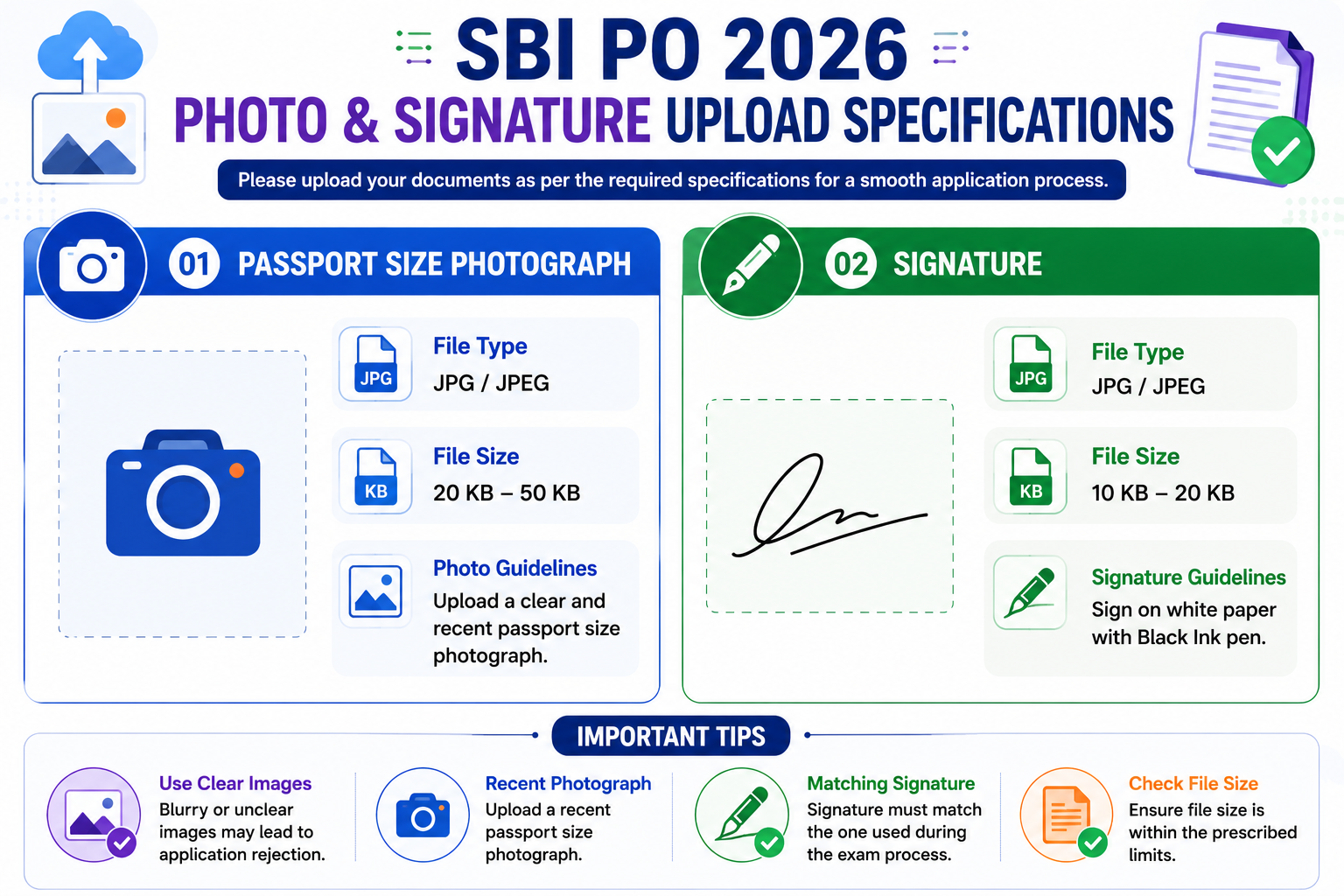
The SBI PO photo size should be in 20 KB - 50 KB, and the signature size should be in 10 KB – 20 KB. For the purpose of uploading the signature, the applicant should use a black ink pen to sign on a white piece of paper. Candidates can also check the SBI PO photo and signature size 2026 format provided here. The State Bank of India has released the SBI PO notification 2026 on its official website. To apply for this recruitment, candidates need to provide accurate information and upload documents in the correct format, size, and dimensions. Uploading a photo, signature, and thumb impression is a crucial step in submitting the application. This article provides key details on photo and signature size, format, and dimensions to help applicants. This page is a valuable resource for applicants looking for detailed information and instructions on the SBI PO Photo and Signature Size 2026.
Check SBI PO Official Exam Date 2026
SBI PO Photo and Signature Size 2026
The table below contains the SBI PO photo and signature size 2026 with details of file type, size, and dimensions. Ensure that you upload the file size within the permitted range.
SBI PO Handwritten Declaration 2026
SBI PO Previous Year Question Paper
SBI PO Photo and Signature Size in cm
Candidates can check the complete details of the SBI PO photo and signature size in the table below.
|
SBI PO Photo and Signature Size 2026 |
|||
|
Document |
File Type |
File Size |
Dimensions |
|
Passport Size Photograph (4.5cm × 3.5cm) |
jpg/jpeg |
20 KB – 50 KB |
200 x 230 pixels (preferred) |
|
Signature (on white paper with a Black Ink pen) |
jpg/jpeg |
10 KB – 20 KB |
140 x 60 pixels (preferred) |
SBI PO Syllabus & Exam Pattern 2026
SBI PO Photo and Signature 2026 Guidelines
Candidates can check the important instructions to note regarding the SBI PO photo size 2026 and SBI PO signature size 2026.
SBI PO Photo Size 2026
Candidates can check the important instructions provided below.
- The photograph must be a recent passport-style colour picture.
- Make sure that the picture is coloured and is taken against a light-coloured, preferably white background.
- Look straight at the camera with a relaxed face.
- If the picture is taken on a sunny day, have the sun behind you, or place yourself in the shade, so that you are not squinting and there are no harsh shadows.
- If you have to use flash, ensure there is no "red-eye".
- If you wear glasses, make sure that there are no reflections and your eyes are clearly visible.
- Caps, hats, and dark glasses are not acceptable. Religious headwear is allowed, but it must not cover the face.
- Dimensions 200 x 230 pixels (preferred).
- The size of the file should be between 20 KB to 50 KB.
- Ensure that the size of the scanned image is not more than 50 KB. If the size of the file is more than 50 KB, then adjust the settings of the scanner, such as the DPI resolution, no. of colours, etc., during the process of scanning.
- The candidate should retain 8 copies (approx.) of the same photograph that was uploaded at the time of online registration of the application, as these would be needed for further processing of this selection process.
Check Detailed SBI PO Salary 2026
SBI PO Photograph Capture Details
- In addition to the above photograph, candidates will also be required to capture and upload their live photograph either by using a webcam or a mobile phone.
- On selecting the “Capture Photo” option, candidates’ webcam will be activated, allowing them to click their picture, which will get auto-uploaded in the application form.
- On selecting the “Click here to Scan” option, candidates can use their mobile phone to scan the QR code, which will redirect to a website, allowing them to click a photograph on their mobile phone. On selecting the taken picture, the photograph will get auto uploaded to the application form.
| Do’s and Don’ts of Photo Capture | |
| Do's | Dont's |
|
|
SBI PO Signature Size 2026
Candidates can check the important instructions provided below.
- The applicant has to sign on white paper with a Black Ink pen.
- The signature must be signed only by the applicant and not by any other person.
- The signature will be used to put on the Call Letter and wherever necessary.
- If the Applicant’s signature on the answer script, at the time of the examination, does not match the signature.
- On the Call Letter, the applicant will be disqualified.
- Dimensions 140 x 60 pixels (preferred).
- The size of the file should be between 10 KB to 20 KB.
- Ensure that the size of the scanned image is not more than 20 KB.
- Signature in CAPITAL LETTERS shall NOT be accepted.
Other Important Links Related To SBI PO 2026
Procedure For Scanning SBI PO Photo and Signature 2026
Set the scanner resolution to a minimum of 200 dpi (dots per inch).
- Set Colour to True Colour and the File Size should be as specified above.
- Crop the image in the scanner to the edge of the photograph/ signature/ left-hand thumb impression/ hand-written declaration, then use the upload editor to crop the image to the final size (as specified above).
- The image file should be in ‘JPG’ or ‘JPEG’ format. An example file name is: ‘image01.jpg’ or ‘image01.jpeg’.
- The dimensions of the Image can be checked by listing the folder files or moving the mouse over the file image icon.
- Candidates using MS Windows/MS Office can easily obtain the documents in ‘.jpeg’ format, not exceeding the required size, by using MS Paint or MS Office Picture Manager.
- The scanned photograph/ signature/ left-hand thumb impression/ hand-written declaration in any format can be saved in ‘.jpg’ format by using the ‘Save As’ option in the File menu, and size can be adjusted using the crop and then resize options.
- If the file size and format are not as prescribed, an error message will be displayed.
- While filling in the Online Application Form, the candidate will be provided with a separate link to upload his/ her photograph/ signature/ left-hand thumb impression/ hand-written declaration.
Procedure For Uploading SBI PO Photo and Signature 2026
There will be separate links for uploading the photograph, signature, Left-Hand Thumb Impression & Hand-Written Declaration.
- Click on the respective link “Upload Photograph, Signature, Left-Hand Thumb Impression & Hand-Written Declaration”.
- Browse and select the location where the Scanned Photograph, Signature, Left-hand Thumb Impression & Hand-Written Declaration file has been saved.
- Select the file by clicking on it.
- Click the ‘Open/ Upload’ button.
- If the file size and formats are not as prescribed, an error message will be displayed.
- A preview of the uploaded image will help to see the quality of the image. In case of unclear/ smudged, the same may be re-uploaded to the expected clarity/ quality.
FAQs
Q: What is the required size for the SBI PO photograph in 2026?
The photo should be between 20 KB and 50 KB, in JPG/JPEG format, with clear visibility and a light-colored background.
Q: What are the specifications for uploading the signature?
The signature should be in black ink on white paper, scanned and saved in JPG/JPEG format, with a file size between 10 KB and 20 KB.
Q: Can I use a selfie as my photograph for the SBI PO application?
No. Selfies are not accepted. You must upload a recent passport-size colour photograph with a clear view of your face.
Q: What are the dimensions for the photograph and signature?
Photograph: 200 x 230 pixels (preferred)
Signature: 140 x 60 pixels (preferred)
Q: What happens if I upload an image in the wrong size or format?
The system may reject your application, or it may get disqualified during the verification stage, so always follow the specified guidelines.
Q: Can I scan my signature using a mobile app?
Yes, you can use a scanning app, but ensure the image is clear, well-lit, and within the size and format limits before uploading.
Q: Is it necessary to upload a thumb impression and a handwritten declaration too?
Yes, SBI may ask for a left thumb impression and a handwritten declaration in the specified format. Check the official notification for the exact file size and text content.
Q: Where can I find the correct upload instructions for documents?
All the official guidelines, size limits, and format requirements are listed in the SBI PO notification 2026 and summarised on this page for your convenience.

Trending Notification
- IBPS RRB Notification
- IBPS Clerk Notification
- SBI PO Notification
- IBPS PO Notification
- SBI Clerk Notification
- SSC JE Notification
- SSC CGL Notification
- SSC CHSL Notification
- SSC MTS Notification
- SSC CPO Notification
- SSC GD Notification
- RRB Group D Notification
- RRB NTPC Notification
- RRB ALP Notification
- RRB JE Notification
General Awareness Smart Analysis (Smart Quiz 2.0)
- Get Weekly 4 set Test
- Each Set consist of 50 Questions
- Compare your progress with Test 1 & 2 & Test 3 & 4
- Deep Analysis in topic wise questions
Super Plan
- All Banking PDF Course 2026, 2025, 2024
- All Banking Video Course
- All Banking Mock Test Series
- All Banking Bundle PDF Courses
- All Banking Ebooks
- All Banking Interview Courses Not Included
Premium PDF Course
- Bundle PDF Course 2025
- Premium PDF Course 2024
- Prime PDF Course 2023